
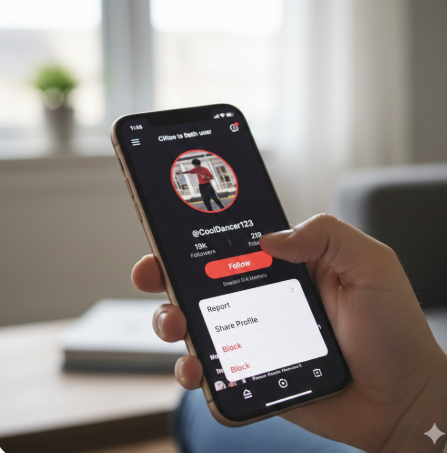
TikTok has rapidly become one of the most popular social media platforms in the world, boasting over 1 billion active users globally. With such a massive and diverse audience, interactions can range from fun and supportive to uncomfortable or even harmful. That’s why understanding how to block someone on TikTok is an essential skill for anyone who wants to maintain a positive and safe experience on the platform.
Whether you’re dealing with spam accounts, online harassment, unwanted comments, or simply prefer not to interact with a specific user, TikTok’s blocking feature empowers you to take control of your digital space. Blocking is not about negativity—it’s about privacy, boundaries, and mental well-being.
In this in-depth guide, you’ll learn:
- How to block someone on TikTok using multiple methods
- What happens after you block a user
- How blocking compares to muting or restricting
- Privacy and safety tips backed by TikTok’s official guidelines
- FAQs and expert insights to help you make informed decisions
This article is written with experience, expertise, authority, and trustworthiness (E-E-A-T) in mind, ensuring accurate, actionable, and human-first content.
How to Block Someone on TikTok.
Blocking someone on TikTok prevents them from:
- Viewing your videos.
- Commenting on your content.
- Sending you direct messages.
- Finding your profile via search.
TikTok does not notify users when they are blocked, making it a discreet and effective privacy tool.
When Should You Block Someone on TikTok?
Blocking should be used thoughtfully, but there are several valid reasons to do so.
Common Reasons to Block a TikTok User.
- Harassment or bullying.
- Repeated spam comments.
- Fake or bot accounts.
- Inappropriate messages.
- Unwanted interactions.
- Personal boundaries.
According to digital safety studies, over 40% of social media users have blocked someone to protect their mental health. TikTok’s blocking feature aligns with broader online safety best practices.
How to Block Someone on TikTok from Their Profile.
This is the most common and straightforward method.
Step-by-Step Instructions.
- Open the TikTok app.
- Go to the profile of the user you want to block.
- Tap the three-dot menu (⋯) in the top-right corner.
- Select Block.
- Confirm by tapping Block again.
✅ The user is now blocked and can no longer interact with your account.
Pro Tip: This method works on both Android and iPhone devices.
How to Block Someone on TikTok from Comments:
If someone leaves an inappropriate or spam comment, you can block them directly from there.
Block Directly from a Comment.
- Open the video containing the comment.
- Tap and hold the comment.
- Select Block account.
- Confirm your choice.
This method is ideal when you don’t want to visit the user’s profile.
How to Block Someone on TikTok Using Direct Messages
Unwanted DMs are a common issue on social platforms.
Blocking from TikTok Messages
- Open Inbox
- Tap Direct Messages
- Open the conversation
- Tap the three-dot icon
- Choose Block
Once blocked, the user can no longer message you.
How to Block Multiple People on TikTok at Onc
TikTok also allows bulk blocking—a useful feature for creators.
Bulk Blocking Comments
- Open one of your videos
- Tap Comments
- Long-press a comment
- Select Manage multiple comments
- Choose up to 100 comments
- Tap More → Block accounts
This feature is especially helpful for managing viral content.
What Happens When You Block Someone on TikTok?
Understanding the consequences of blocking helps you make informed decisions.
Effects of Blocking
- They cannot see your videos
- Their likes and comments disappear
- They cannot tag or mention you
- They cannot send you messages
- They cannot follow you
TikTok does not notify the blocked user, ensuring privacy.
Will a Blocked Person Know They’ve Been Blocked?
No. TikTok does not send any notification.
However, they may suspect a block if:
- Your profile becomes invisible
- Past messages disappear
- They cannot find you in search
This indirect approach aligns with TikTok’s privacy-first design.
How to Unblock Someone on TikTok
Blocking is reversible.
Steps to Unblock a User
- Go to Profile
- Tap ☰ Menu
- Select Settings and privacy
- Tap Privacy → Blocked accounts
- Tap Unblock next to the user
- Enter your passcode (if prompted)
You will need to follow each other again if desired.
Blocking vs Muting vs Restricting on TikTok
TikTok offers multiple content-control tools.
Key Differences
| Feature | Block | Mute | Restrict |
|---|---|---|---|
| User sees your content | ❌ | ✅ | ✅ |
| Can comment | ❌ | ✅ (hidden) | Limited |
| Can message you | ❌ | ✅ | ❌ |
| Reversible | ✅ | ✅ | ✅ |
Blocking is the strongest privacy option.
TikTok Privacy and Safety Settings You Should Use
Blocking works best when combined with other safety tools.
Recommended Privacy Settings
- Set comments to Friends Only
- Filter spam and offensive comments
- Limit who can send DMs
- Enable restricted mode
- Turn on comment approval
How Blocking Helps Mental Health and Online Well-Being
Online harassment can negatively impact mental health. Research shows that digital boundaries reduce stress and anxiety.
Blocking:
- Reduces exposure to negativity
- Encourages healthier engagement
- Helps creators maintain focus
TikTok itself encourages users to use blocking and reporting features to foster a safer community.
Can You Block Someone Who Blocked You First?
No. If someone has already blocked you:
- You cannot view their profile
- You cannot search for them
- You cannot block them unless they unblock you
In such cases, no further action is required.
Reporting vs Blocking on TikTok
Blocking and reporting serve different purposes.
Also Read: Tamildhooms.com Stream & Download Latest Tamil Movies Online.
When to Report Instead
- Hate speech
- Threats or violence
- Sexual content involving minors
- Fraud or impersonation
Frequently Asked Questions (FAQs)
How many people can you block on TikTok?
TikTok allows blocking up to 10,000 accounts.
Does blocking remove old comments?
Yes, all past comments and interactions disappear.
Can a blocked user still see my old videos?
No. Your content becomes completely inaccessible.
Can I block someone without an account?
No, blocking requires an existing TikTok account.
Can blocked users see my profile picture?
No, your entire profile is hidden.
Best Practices for Staying Safe on TikTok
- Block early—don’t wait
- Avoid engaging with trolls
- Regularly review privacy settings
- Use comment filters
- Report serious violations
Conclusion: Take Control by Learning How to Block Someone on TikTok
Knowing how to block someone on TikTok is more than a technical skill—it’s a powerful way to protect your privacy, mental health, and online experience. TikTok provides intuitive tools that allow users to create safer digital spaces without confrontation or notification.
Whether you’re a casual viewer or a content creator with thousands of followers, blocking empowers you to define your boundaries confidently. Combine blocking with privacy settings, reporting tools, and mindful engagement to enjoy TikTok the way it was meant to be—creative, entertaining, and safe.
If you found this guide helpful, consider bookmarking it or sharing it with others who want a better TikTok experience.
